
Introduction
Stitcher was one of the original podcast platforms, with a passionate listener base and a respected legacy. But by the time I joined, the product was showing its age and that was reflected in it’s app store ratings. Users were frustrated, retention was slipping, and internal teams were struggling to deliver improvements due to outdated architecture and design + technical debt.
I led UX design and research for a complete redesign of the Stitcher experience, across all major platforms. The goal: build a modern, scalable app that would honor our loyal users while attracting a new generation of podcast fans.
The Challenge
By the time I joined Stitcher, the app had become outdated and difficult to maintain. It’s Android rating had dropped to below 3 stars, and user complaints were mounting around everything from bugs to confusing navigation. Internally, the app’s legacy architecture made it difficult to ship improvements without risking crashes or regressions.
Our team faced a twofold challenge:
- Deliver a dramatically improved experience for users across mobile and web — one that felt modern, intuitive, and built around real listening habits.
- Lay a scalable foundation for the future, including a new backend, a robust design system, and a product culture centered around user empathy, iteration, and cross-functional collaboration.
To succeed, we needed to rethink the app from the ground up, not just how it looked, but how it worked, how it was maintained, and how it could evolve.
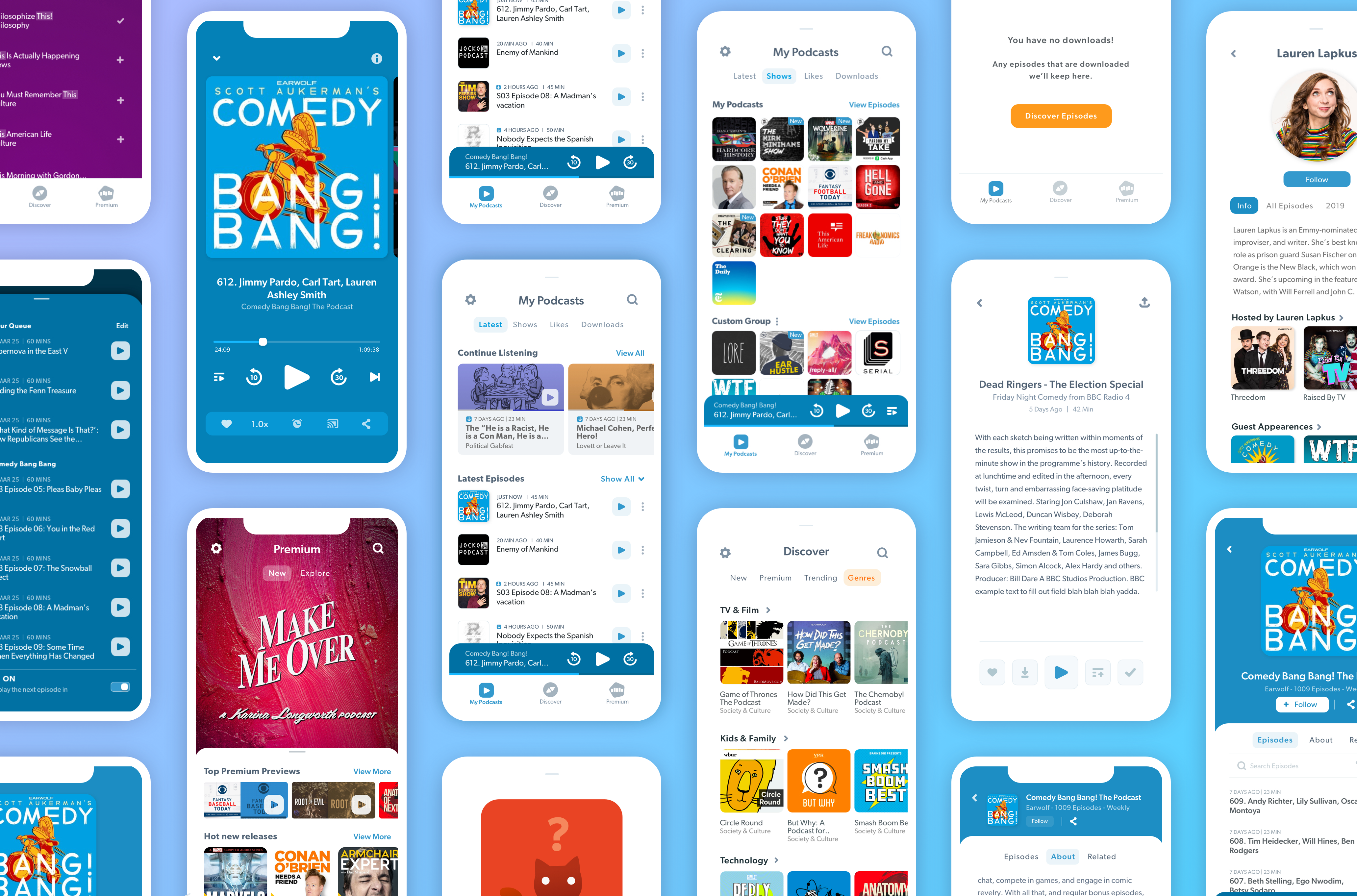
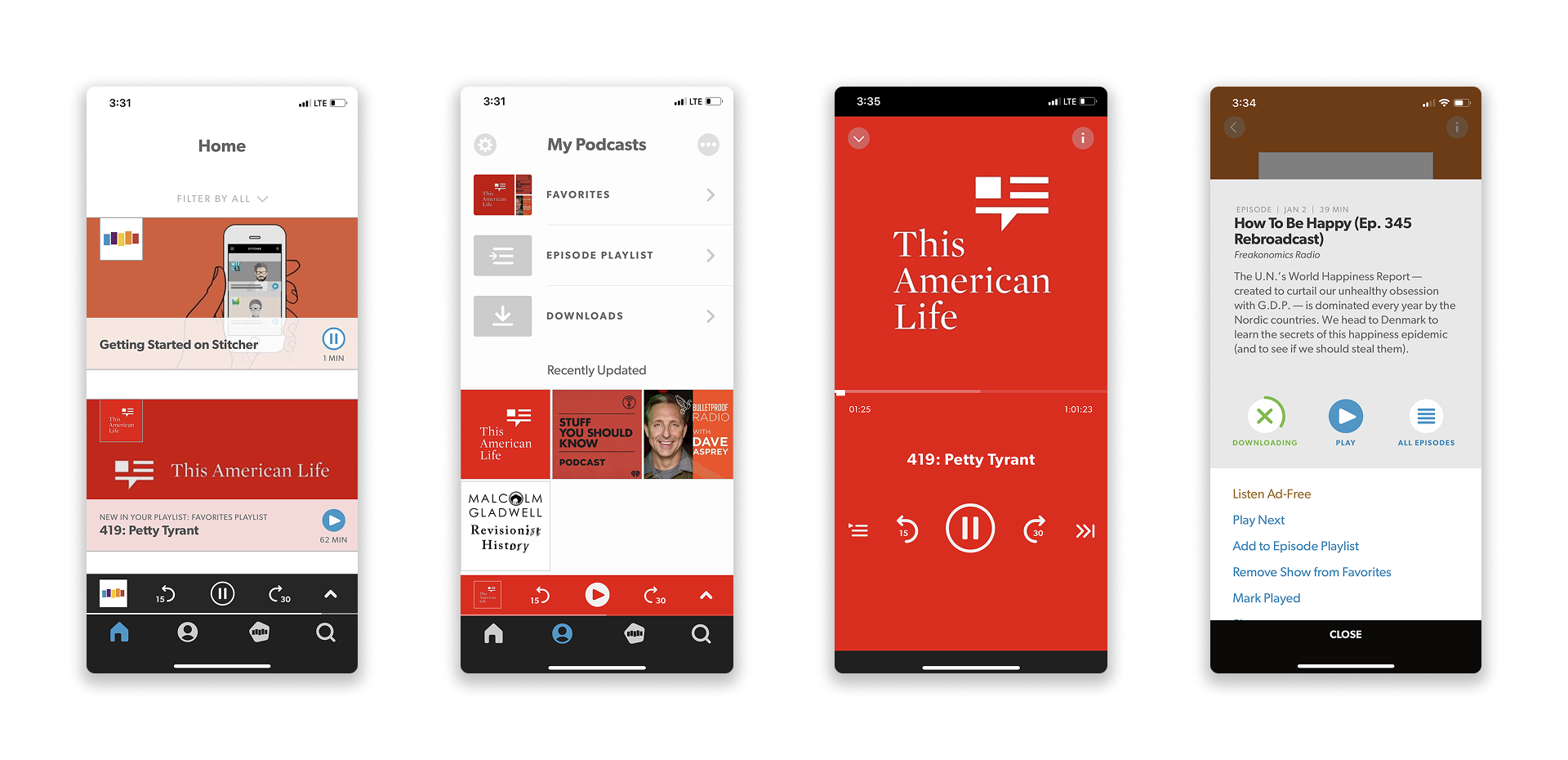
Sample screenshots from original Stitcher app
Early Research – Meeting our users
But the impact went beyond just research. Sharing user feedback sparked energy across the company. Engineers, PMs, marketers — everyone wanted to know what users were saying.
To harness that momentum, I co-founded an internal brainstorming group:
- I partnered with our data team to identify a list of recently active and recently churned users within a 50-mile radius, reaching out personally to invite them to in-person testing sessions.
- Over time, I would go on to conduct more than 70 moderated tests, both in-person and remotely (as the pandemic unfolded).
- I created templates for test plans, coordinated scheduling, and developed a research cadence that kept our team close to real user behavior.
But the impact went beyond just research. Sharing user feedback sparked energy across the company. Engineers, PMs, marketers — everyone wanted to know what users were saying.
To harness that momentum, I co-founded an internal brainstorming group:
- We ran open ideation workshops with stakeholders across the org.
- We created a shared Slack channel to share clips, feedback, ideas, and opportunities.
- We started building quick prototypes — not just for testing, but to inspire the company and visualize what a better Stitcher could look like.
These early efforts laid the cultural groundwork for what would become Stitcher X — a company-wide initiative to redesign the product from the ground up, sparked by our prototypes and research findings, and greenlit after we presented to leadership.
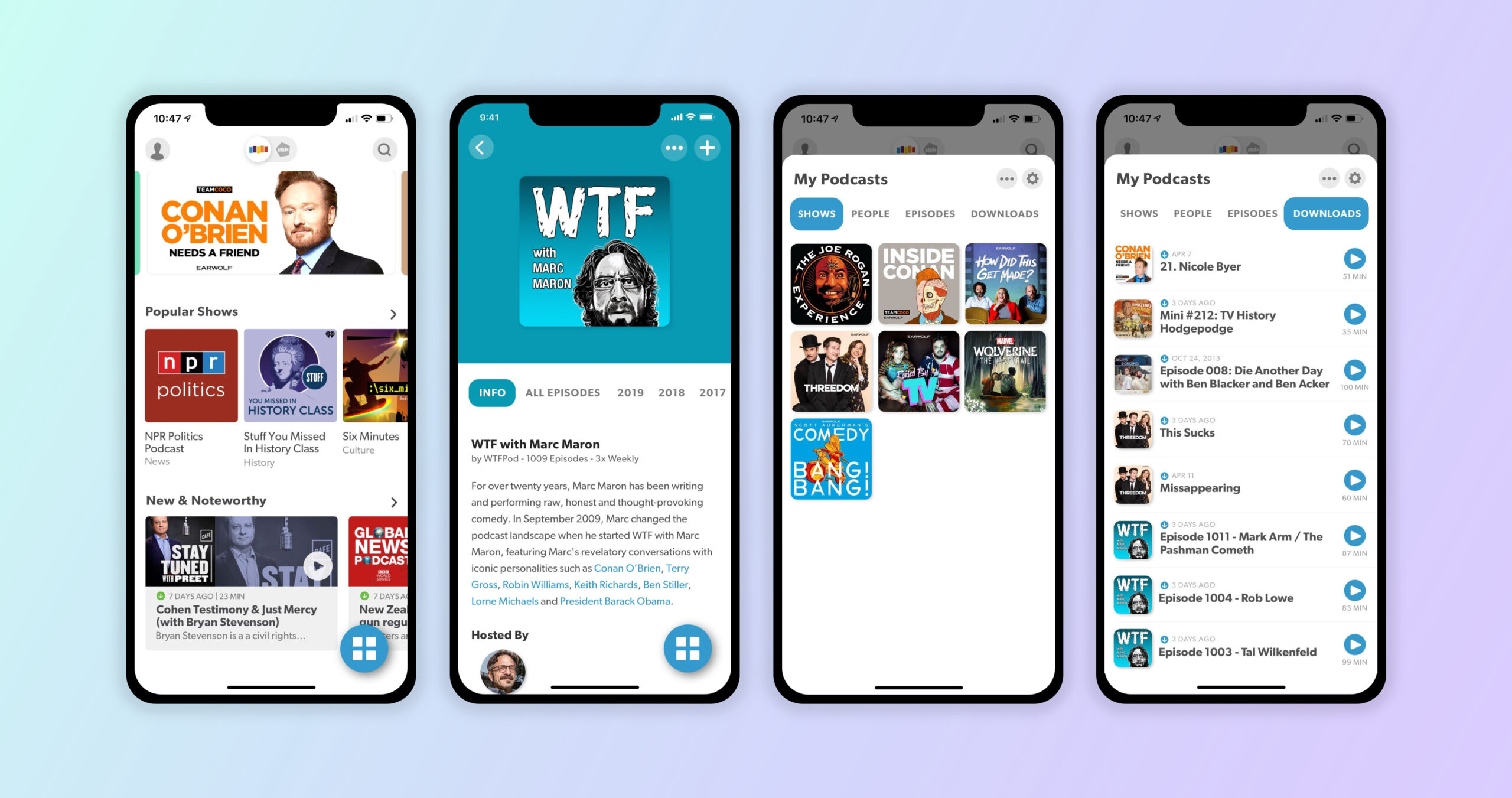
Screenshots from our early prototype
From Research to Rallying Cry
What began as a scrappy user testing initiative quickly turned into something bigger: a shift in how the company thought about product design.As user feedback circulated across the org, curiosity turned into excitement. Engineers dropped by to hear test debriefs. PMs brought questions to our Slack channel. Designers and marketers chimed in with their own insights. The buzz was contagious. Sensing an opportunity to channel that momentum, I co-led the creation of a cross-functional Brainstorming Group — a space where anyone could participate in design workshops, contribute ideas, and co-create prototypes. These weren’t just thought exercises — they were tangible explorations grounded in user needs and business goals.
One prototype in particular — a reimagined experience we nicknamed “The Bloop” — became a company favorite. It wasn’t perfect, but it represented something powerful: a new mindset. One that prioritized user-first thinking, shared ownership, bold ideas, and rapid iteration.
We presented it to leadership. They didn’t just love it — they backed it.
From that meeting forward, Stitcher X became a real project: a full redesign of the Stitcher app and website, backed by executive support and a reinvigorated team. We weren’t just fixing pain points anymore. We were rethinking the future of the platform — and doing it with a design-driven, research-led approach.
Research & Planning
To create a truly user-centered redesign, we had to start by understanding what was broken and why users were leaving. I launched a robust research program with several goals in mind:
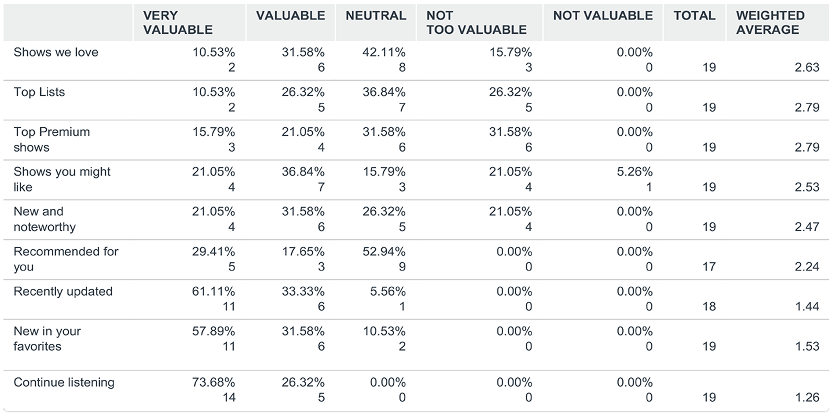
To get answers, I built Stitcher’s first formal UX research program. I started by partnering with our data team to identify active and recently churned users within a 50-mile radius. I then personally reached out to schedule in-person interviews and usability sessions. These sessions gave us invaluable insight into not only user behaviors, but also their motivations and frustrations.
When the pandemic hit, I pivoted to remote moderated testing via Zoom. Over the course of the project, I conducted more than 70 usability tests — ranging from concept walkthroughs to live interaction with evolving prototypes.
In parallel, we distributed a targeted email survey to our most active users, capturing over 500 responses that illuminated common UX complaints and wishlist features. We also partnered closely with the support team to mine trends from user-submitted tickets and feedback.
Each week, I facilitated internal share-outs and cross-functional research reviews, which turned insights into alignment. We’d even run empathy mapping workshops as a group to better understand our listener archetypes.
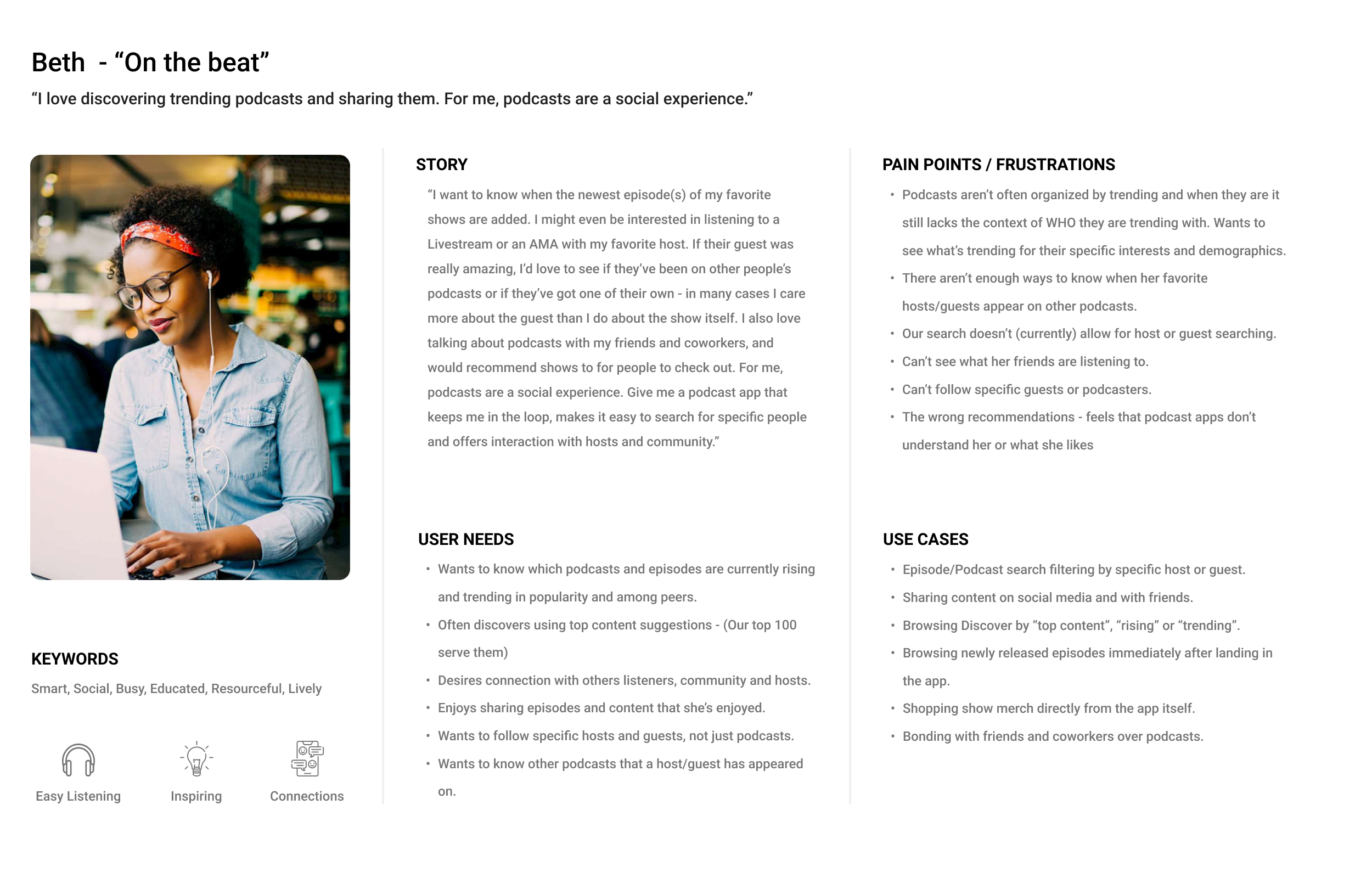
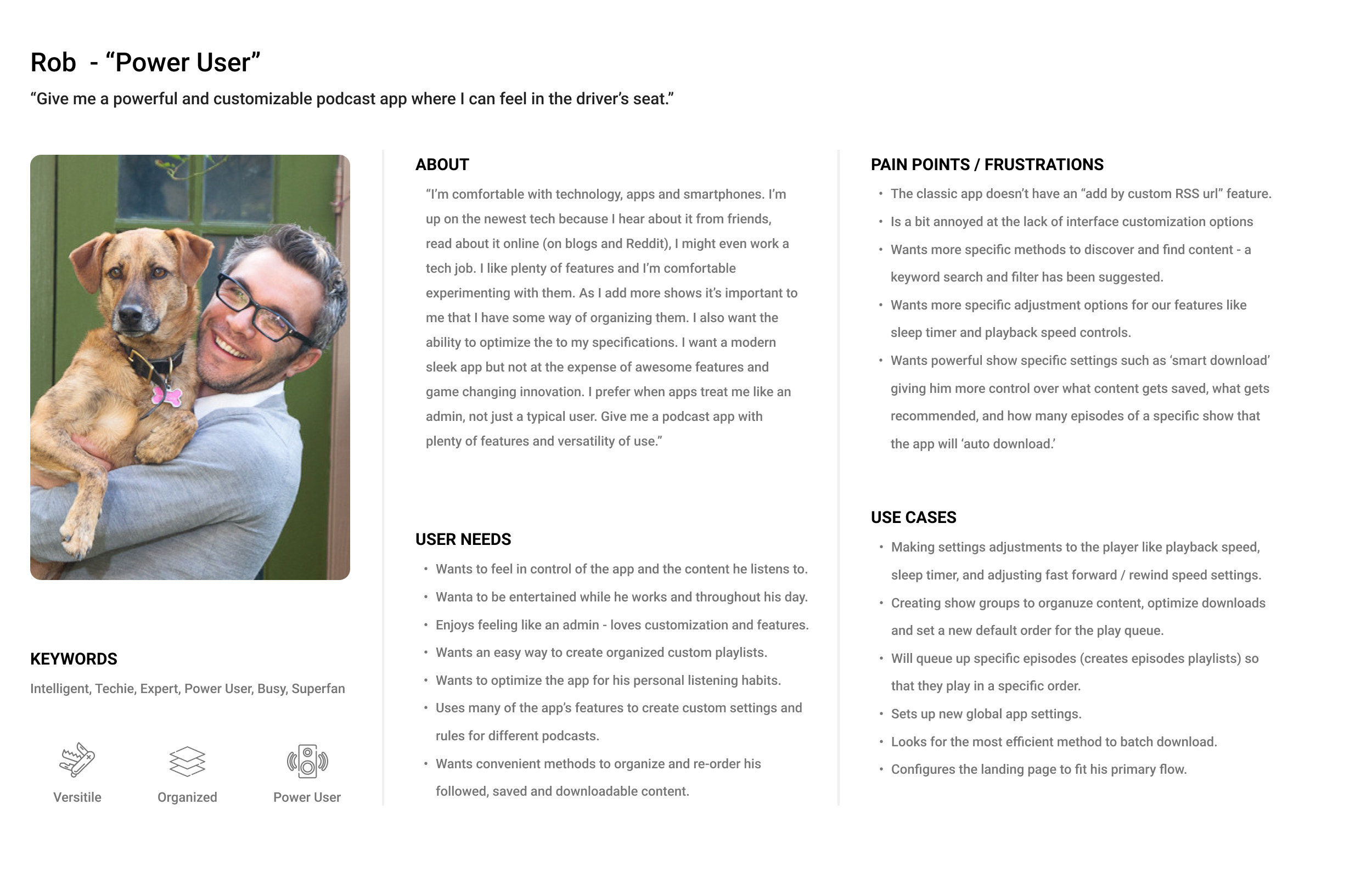
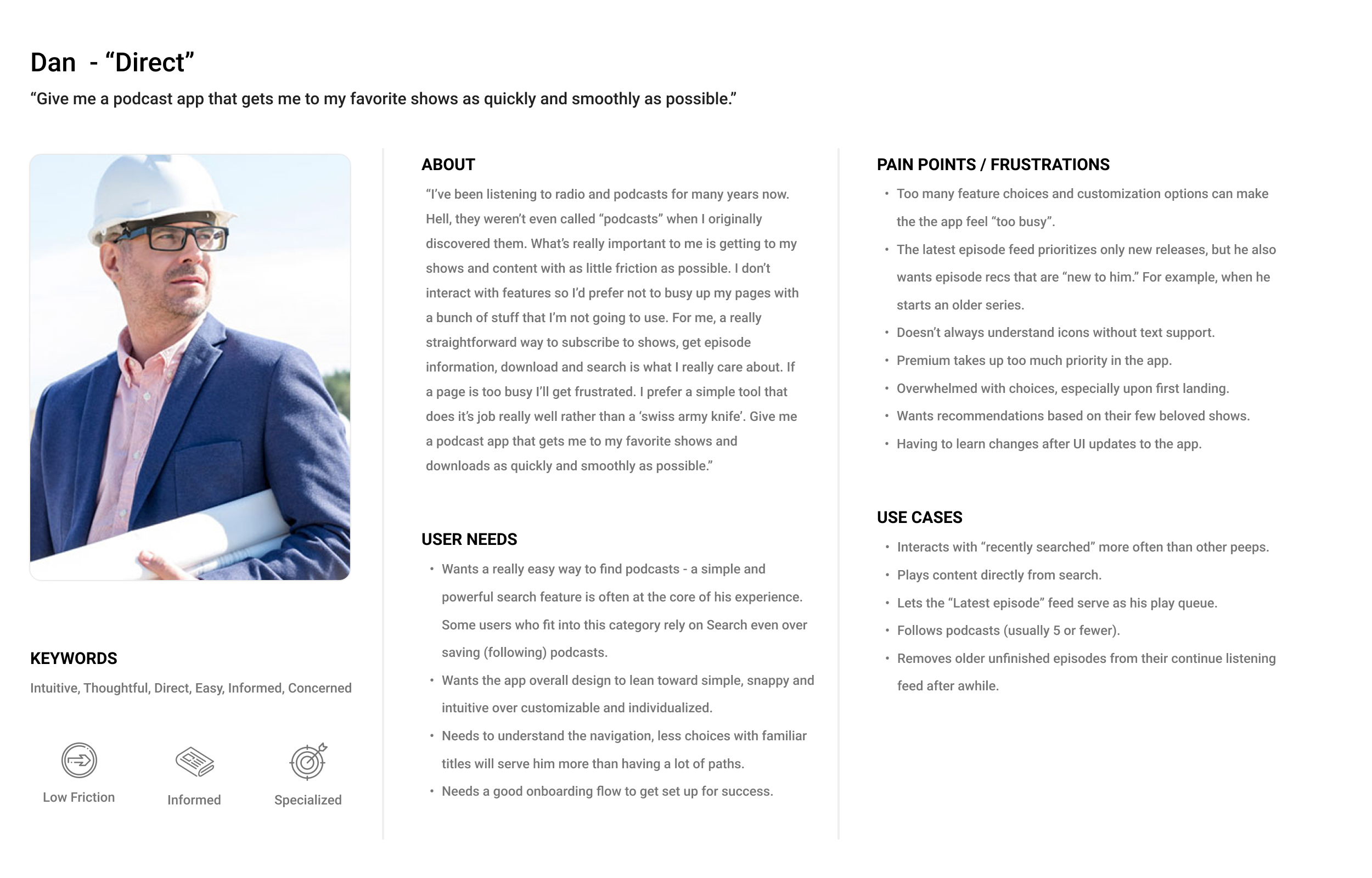
Ultimately, this research led to the creation of three core user personas that served as reference points throughout the redesign. These living documents helped unify the team around shared user needs and informed everything from IA structure to feature prioritization.
Example user personas:
Competitor Analysis
To better understand the podcast app landscape, we conducted a deep dive into competing products across iOS and Android. This wasn’t just about features — we wanted to understand how others solved common problems, what patterns users were already familiar with, and where Stitcher could stand out.
Our approach included:
- App usage audits: Each designer tested 2–3 competing apps over the course of a week, journaling their experiences, usability pain points, and standout features.
- Feature comparison matrix: We documented and cross-compared feature sets across 10+ apps including Apple Podcasts, Spotify, Pocket Casts, Overcast, Castbox, and others.
- Heuristic evaluations: We assessed apps for clarity, hierarchy, ease of use, and visual communication.
- User review mining: We combed through thousands of App Store and Google Play reviews to see what users loved and hated.

Key Takeaways
- Power users wanted control: Advanced users loved granular customization and robust library management tools (e.g., filtering downloads, custom playlists).
- Discovery was often an afterthought: Many apps buried recommendations or used opaque algorithms, creating an opportunity for us to surface curated and meaningful discovery moments.
- Navigation patterns varied: There was no single standard — some apps used tabs, others drawers or gestures — which helped inform our own IA testing and simplification efforts.
- Brand tone mattered: Apps with a clear brand voice (like Overcast or Castro) resonated emotionally, which reinforced our desire to reconnect Stitcher with its loyal audience.
Testing Strategy
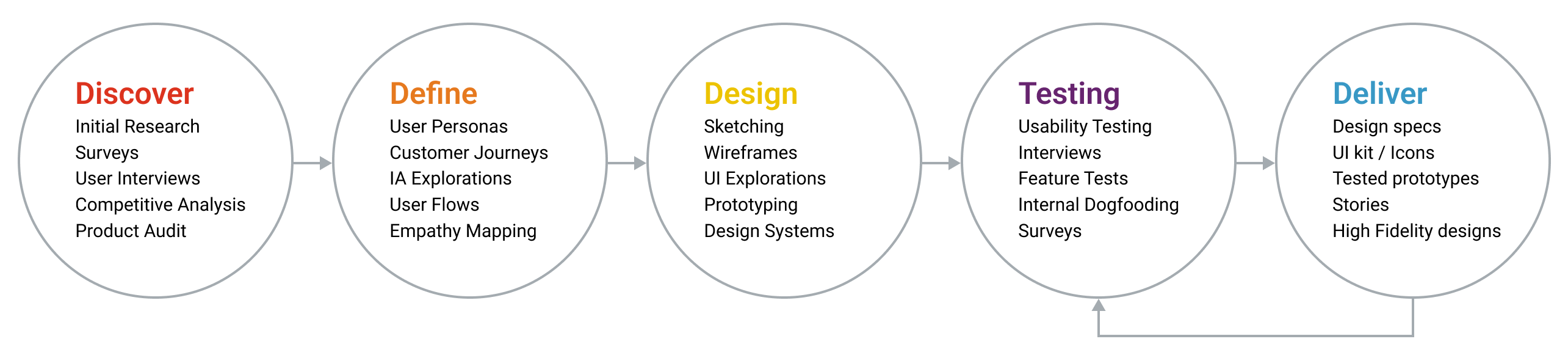
User testing was the backbone of our redesign efforts. Each week, I scheduled moderated testing sessions, typically running Tues–Thurs to allow time for synthesis and reporting on Fridays. We used prototypes at varying levels of fidelity — from lo-fi wireframes to clickable high-fidelity mockups built in Figma or InVision — depending on what we were validating.
Every session focused on a specific flow, feature, or navigation pattern. I kept tests intentionally focused to avoid overwhelming participants and to increase the clarity of their feedback. These results were shared with the broader team through a dedicated Slack channel and weekly recaps, sparking ongoing discussion and iteration across teams.
To keep momentum, I hosted regular “viewing parties” where cross-functional teams could observe user sessions and participate in exercises like empathy mapping and note-taking. This helped build a shared understanding of user needs across product, design, and engineering.
Designing a Solution
Information Architecture
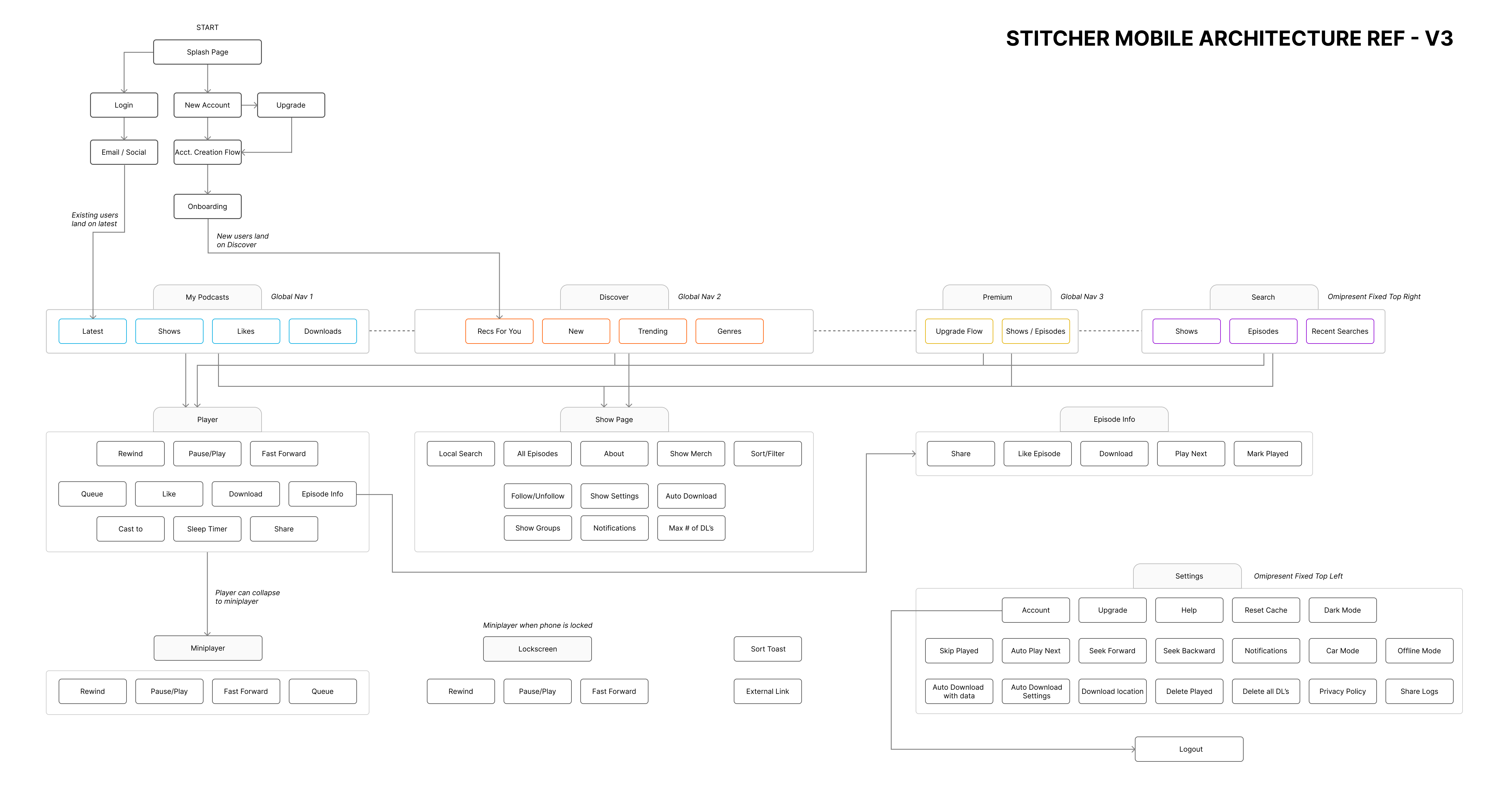
Using insights from our interviews, persona needs, and competitor analysis, we created a simplified navigation model. Our goal was to ensure that both new and long-time users could easily:
- Find their saved and downloaded shows
- Discover new content based on their interests
- Search and filter with ease
- Access Premium content without confusion
- Manage their settings and listening history
After several iterations and usability tests, we landed on a streamlined bottom navigation bar that separated core actions: Home, Search, Library, Premium, and Settings. This layout aligned with user mental models and significantly reduced friction.
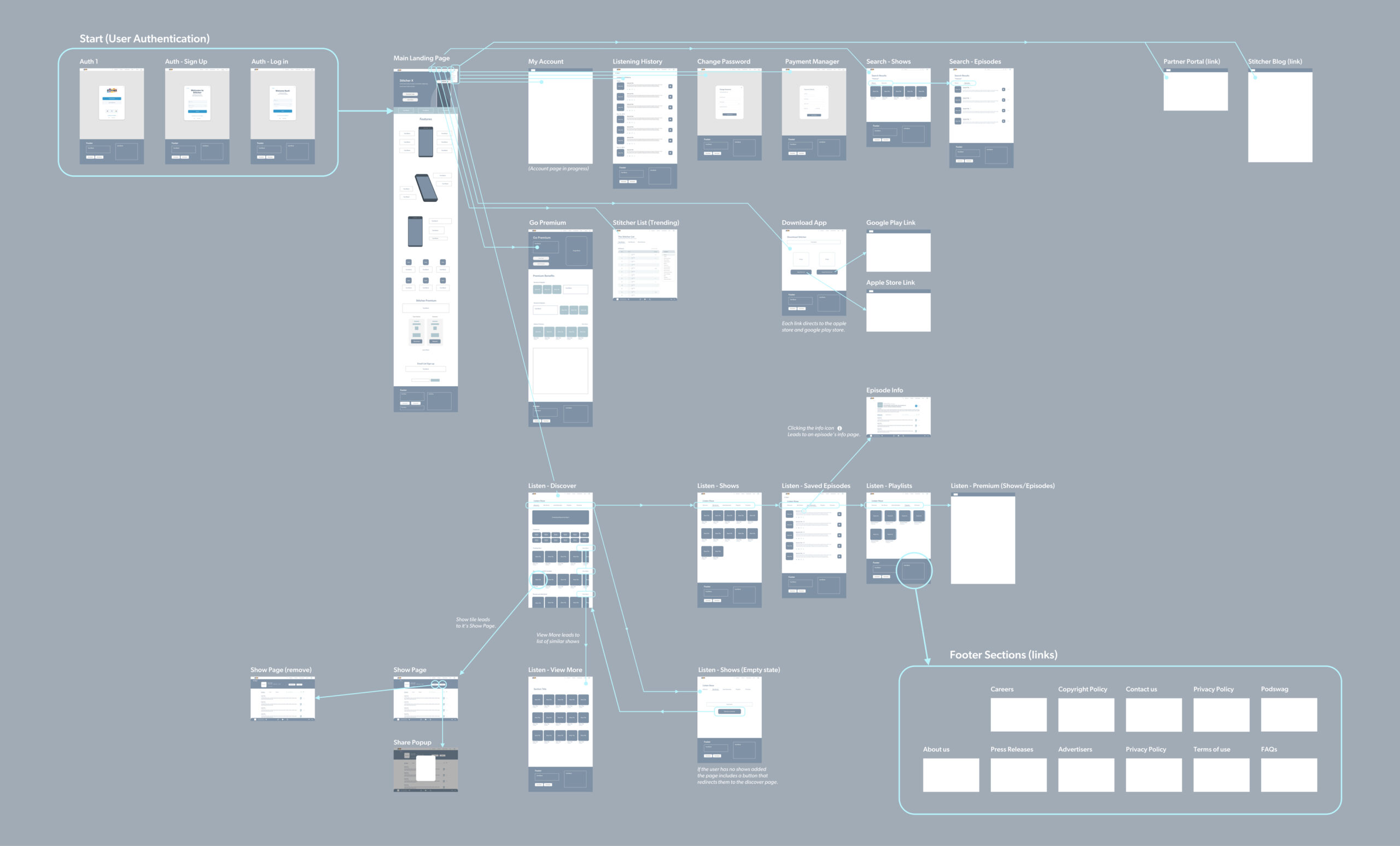
We also developed a parallel information architecture for the website, focused on improving searchability, showcasing original content, and giving marketing teams tools to highlight features from the redesigned app.
Mobile app architecture
User Flows & Journey Mapping
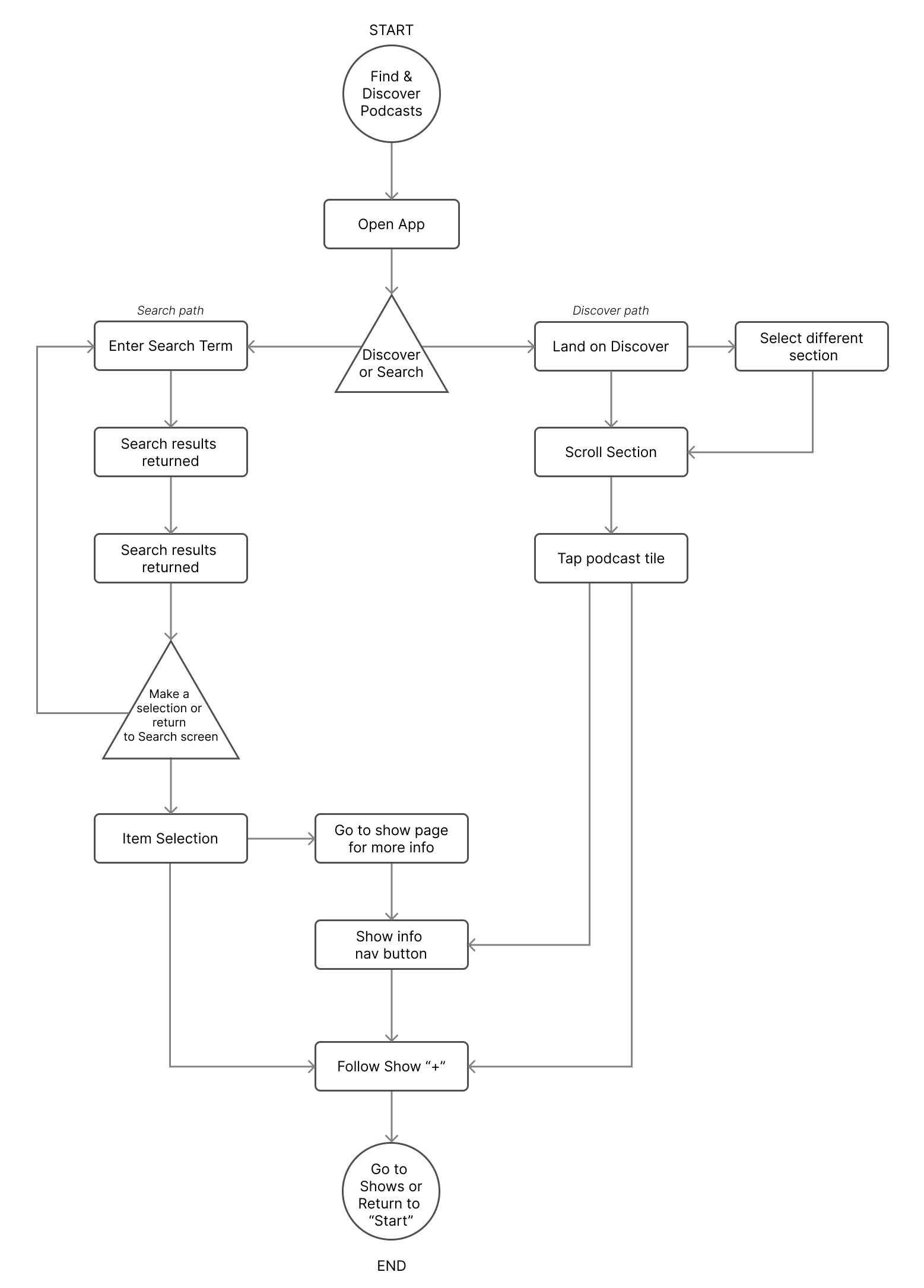
With our updated information architecture in place, the next step was to ensure that users could move fluidly through the app’s core experiences. We mapped key flows — such as finding and following a new show, resuming playback, and exploring Premium content — across mobile and web platforms.
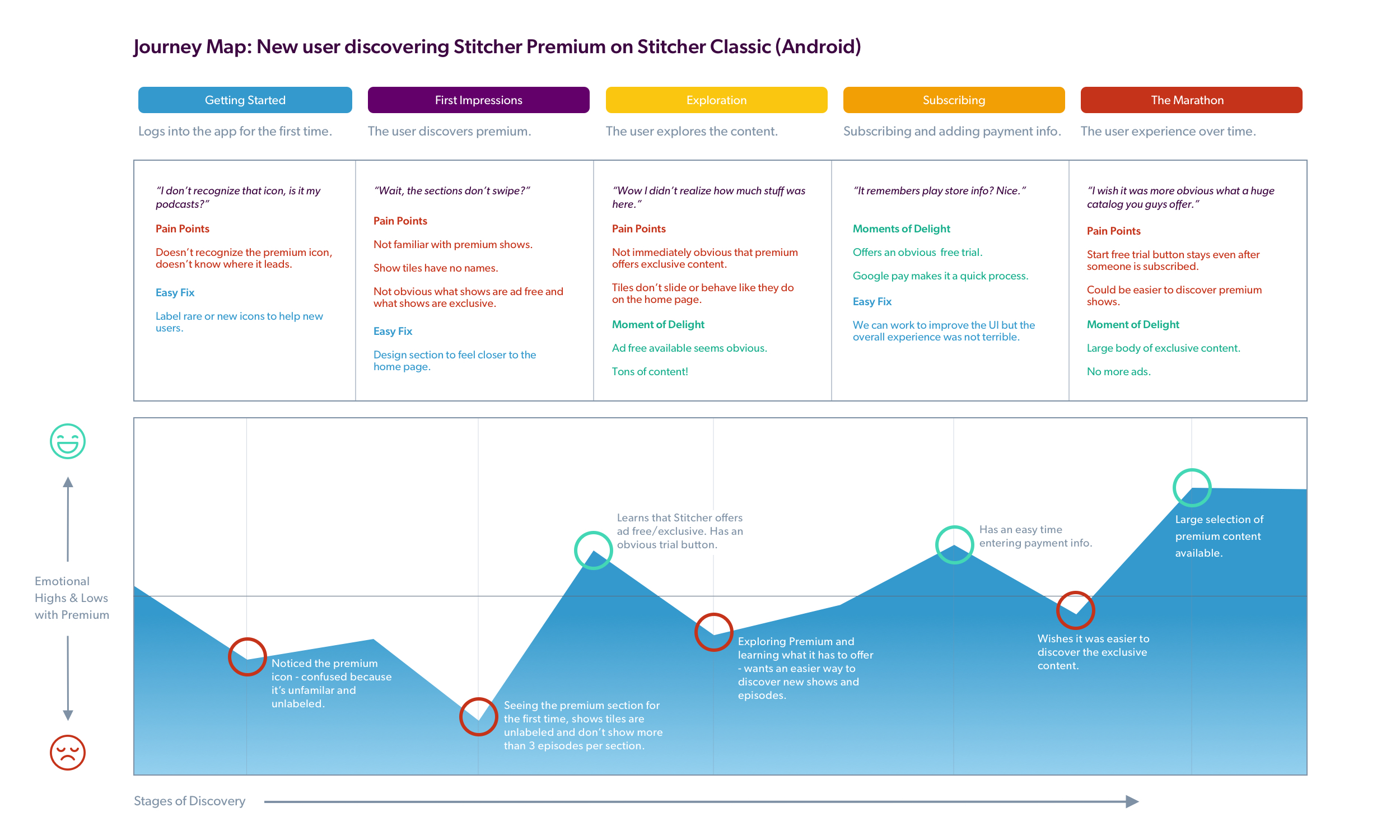
We created detailed journey maps that visualized:
- Emotional highs and lows throughout the experience
- Pain points users encountered during common tasks
- Opportunities for delight, efficiency, and simplification
This mapping process was invaluable for aligning the team around real user needs. It also helped highlight redundancies and dead ends in the legacy experience that we were then able to remove or rework.
To validate our flows, we ran scenario-based testing with real users. For example: “You just heard about a great podcast from a friend — find it, follow it, and download an episode to listen to later.” These kinds of focused, task-driven sessions gave us clarity on what was intuitive and what needed further refinement.
Sample user flows and journey maps from our explorations
Wireframing
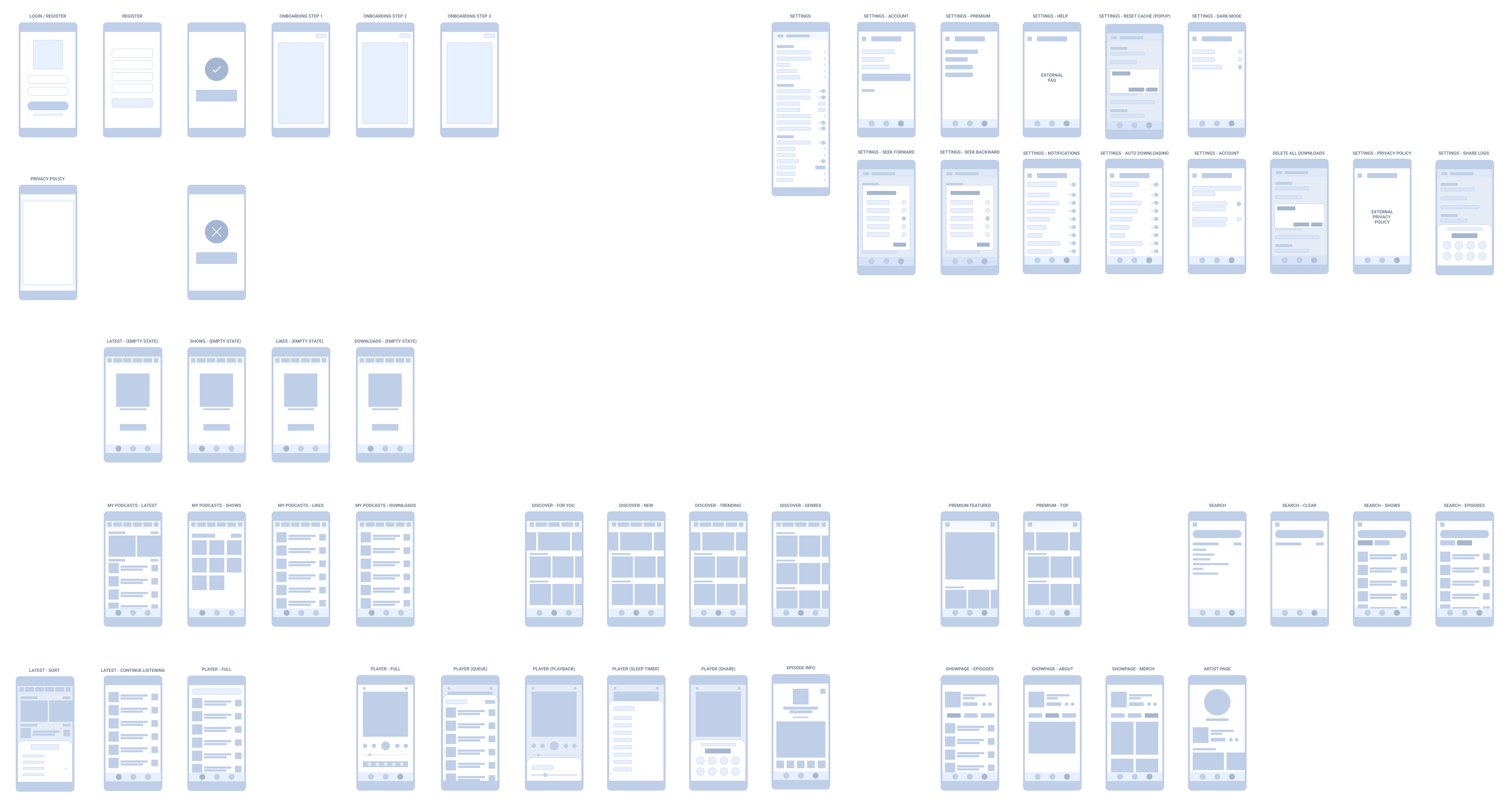
Wireframing played a critical role in our design process, especially in the early and exploratory phases of Stitcher X. We used low-fidelity wireframes to quickly test hypotheses, visualize architecture, and iterate on key interactions before committing to high-fidelity design.
Some key goals of this phase included:
- Validating layout and hierarchy: Ensuring users could easily navigate core sections like Library, Discovery, and Now Playing.
- Stress-testing features early: Prototyping ideas like the omnipresent “bloop” navigation or the Premium toggle with minimal visual polish allowed for quicker testing and faster pivots.
- Keeping the team aligned: Wireframes helped cross-functional stakeholders (engineering, product, support) understand intent early and provide input before buildout.
While our earlier usability tests used wireframes for quick feedback, we gradually shifted toward high-fidelity mocks as the project matured. Still, wireframes were an essential sketchpad for ideas and a key part of our agile process.
Prototyping
Prototypes were an essential part of our design validation process. We used clickable prototypes built in Figma and InVision to test ideas early and often — from initial wireframe concepts to more polished interaction flows. These helped us quickly identify usability issues, improve flows, and align on functionality across stakeholders.
Whenever possible, we tailored each prototype to answer specific questions, such as:
- Can users easily navigate to their saved content?
- Is our new onboarding flow intuitive and engaging?
- Does the redesigned player interface support seamless listening?
Because of our rapid prototyping and testing cycles, we were able to confidently iterate before investing engineering time — saving resources and aligning faster as a team.
High Fidelity Mocks
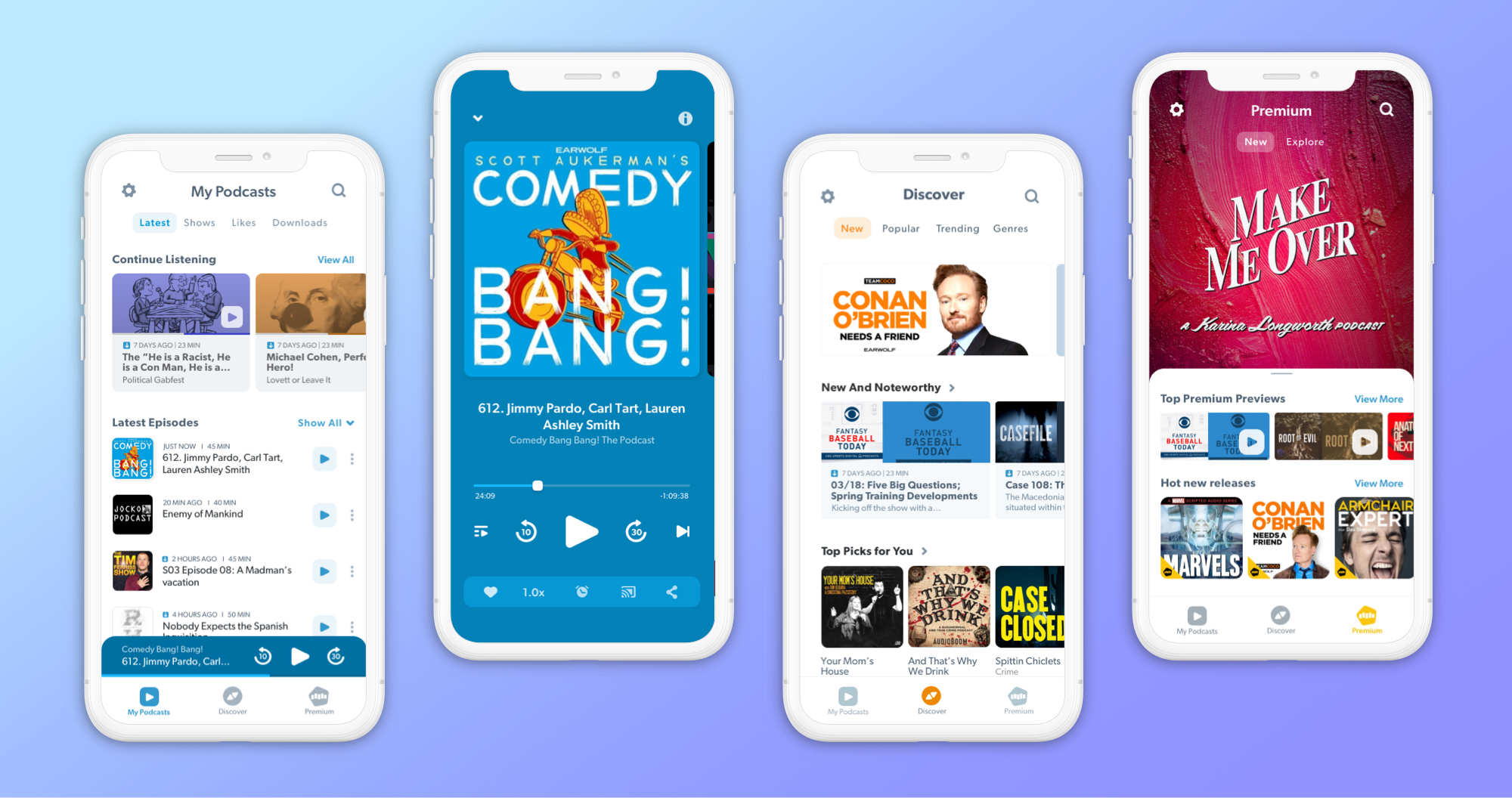
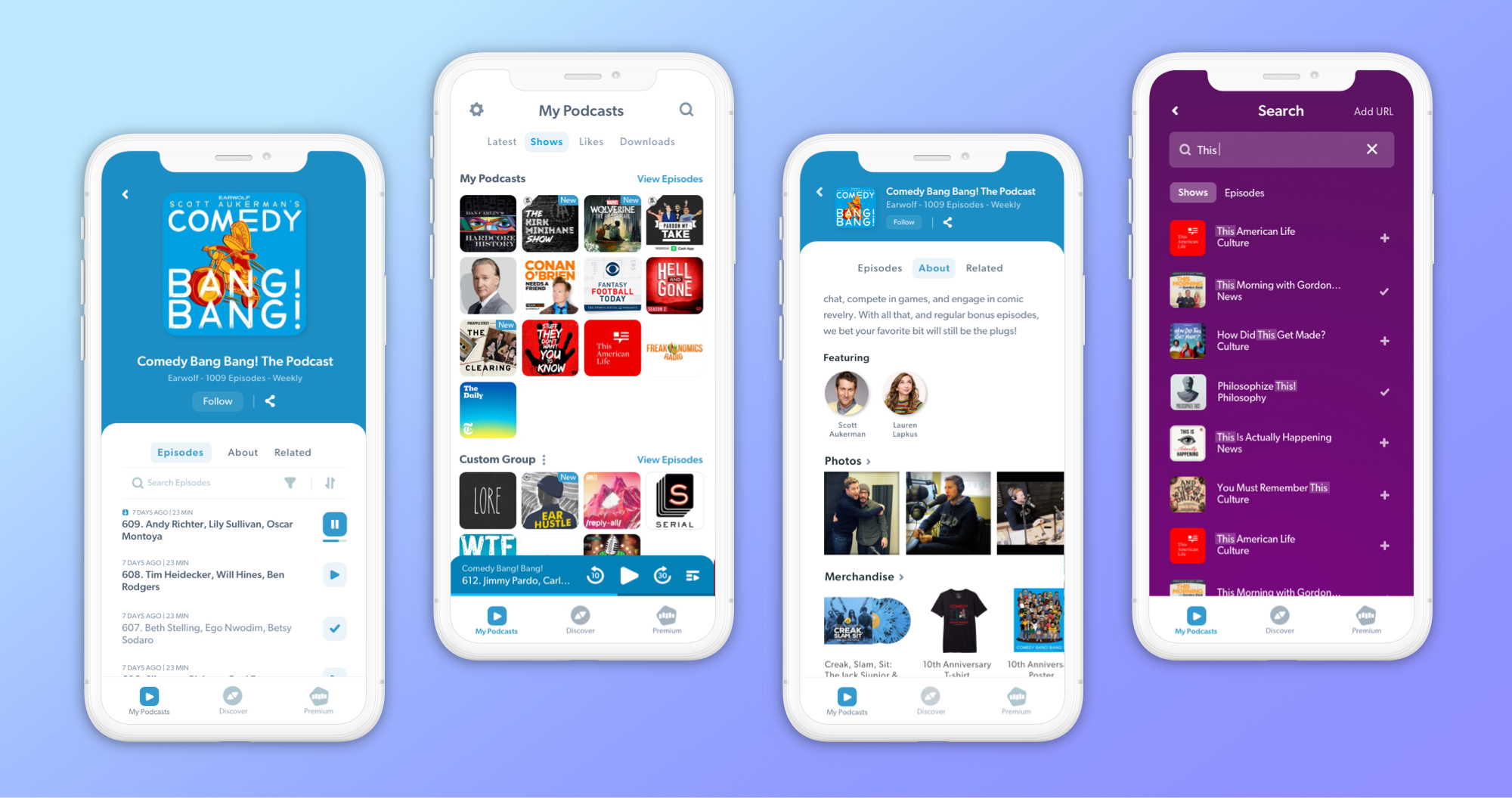
After validating our structure and flows through wireframes and prototypes, we moved into high-fidelity design. These visuals brought the product to life, incorporating updated branding, UI patterns, and accessibility improvements.
Key areas of focus included:
- Show Library & Player: A redesigned listening experience that prioritized clarity, ease of use, and quick access to frequently used features.
- Episode Feed: Streamlined layouts and typographic hierarchy to support scannability and engagement.
- Search & Discovery: A more intuitive interface for discovering new content, with clear categorization and preview states.
- Dark Mode: A complete dark theme rollout to support user preferences and nighttime listening habits.
- Settings & Personalization: Reorganized settings and customization tools to make the app feel more personal and in the user’s control.
Each screen was crafted with attention to detail and refined through cross-functional feedback loops. These designs were then implemented in close collaboration with engineering, QA, and product management.
User Migration
We launched the redesigned Stitcher app with a bold, full-scale rollout — new backend, new UI, new IA, all at once. Our goal was to deliver the complete, modern experience users had been asking for. But in hindsight, the suddenness of that shift was jarring for many of our longtime listeners.
The launch was rocky. Users were met with a radically different interface and flow overnight, and many expressed frustration with the change. We saw a wave of feedback across support channels and app reviews as people adjusted. While we had anticipated some resistance, the volume and intensity were more than expected.
As a team, we held the course — monitoring feedback closely, triaging bugs, and addressing usability gaps quickly. Over time, the experience stabilized. With continued improvements and open communication, user sentiment began to recover. The app’s ratings rose dramatically, engagement improved, and retention numbers climbed.
Looking back, I’d advocate for a more gradual rollout: launching the new backend first to stabilize performance, then layering in UI updates in phases. It was a hard lesson in change management and the emotional bond users form with familiar interfaces. But it also proved the value of staying committed to long-term quality, even through a rough start.
Outcomes & Metrics
Despite a bumpy launch, the redesigned Stitcher app ultimately led to significant and measurable improvements across the board:
- Listening Time Increased by 17%, indicating stronger engagement and user satisfaction with the redesigned experience.
- Weekly-to-Monthly Active User Ratio rose from 29% to 64%, a clear sign that users were returning more consistently.
- User Retention improved from 48% to 56%, helping reduce churn and grow a more loyal listener base.
- Android App Store Rating jumped from 2.3 to 4.7, transforming user sentiment and restoring credibility.
- Successful Acquisition — the improved product and metrics played a meaningful role in Stitcher’s acquisition by SiriusXM
We continued to iterate and respond to feedback post-launch — adding dark mode, improving onboarding, streamlining discovery, and refining the player experience. Our design system made ongoing updates faster and more consistent, and the research practice I initiated remained a central part of the product process long after launch.
The Stitcher redesign wasn’t just a visual upgrade — it was a cultural and strategic shift. It laid the groundwork for a more user-centered, collaborative, and iterative approach to product development — one that delivered lasting value for both the business and its listeners.
Reflections
Redesigning Stitcher was one of the most meaningful and challenging projects of my career. It wasn’t just about shipping a new UI — it was about rebuilding trust with users, reshaping internal culture, and proving that design could be a driving force for product transformation.
From building a research practice from scratch, to collaborating across disciplines, to weathering the storm of a rocky rollout — this project taught me how to lead with empathy, how to rally a team around a shared vision, and how to balance user needs with business goals under real-world constraints.
Most importantly, it reminded me that meaningful product design is rarely a straight line. It’s iterative, sometimes messy, and often requires bold decisions and even bolder listening. But when done right, it can create the kind of impact that outlasts any single launch — and lays the foundation for everything that comes next.